Compress Your Files Without Losing What Matters
Image and PDF Compressor on LigalDocs.com
Anyone who has worked in a law office for more than a week knows the drill. A client sends over a folder of scanned exhibits, each one somehow eight megabytes for a single page of text. A paralegal tries to email a case bundle and gets bounced back because the attachment is “too large.” A signed agreement that should weigh almost nothing balloons into a file that takes ninety seconds to open on a slow connection. None of this is unusual. It’s just the quiet, everyday friction of working with documents, and it adds up faster than most people realize.
That’s the gap LigalDocs.com built its Image Compressor and PDF Compressor to close. These aren’t gimmicky add-ons bolted onto the site for the sake of having “more tools.” They were built because the people who actually use this website — lawyers, paralegals, court clerks, notaries, small business owners handling their own contracts — kept running into the same wall: their files were too big for the places they needed to send them.
Why File Size Quietly Becomes a Legal Problem
It’s easy to dismiss file size as a technical annoyance, something for the IT department to sort out. But in legal and administrative work, it turns into a real bottleneck.
Court e-filing portals almost always cap upload sizes, and scanned exhibits are notorious for blowing past those limits. Email providers still enforce attachment ceilings that haven’t kept pace with how large modern scans and photos have become. Client portals time out on slow uploads. And when you’re dealing with a stack of ID documents, signed affidavits, or property photos as evidence, the file sizes stack up fast — a “small” folder of ten scanned pages can easily cross fifty megabytes if nobody has compressed anything along the way.
The usual workaround is frustrating: convert everything to a lower resolution and hope it still looks readable, or split documents into multiple smaller files and hope the recipient reassembles them correctly, or just give up and courier a physical copy. None of these are real solutions — they’re patches on a problem that shouldn’t exist in the first place.
That’s the whole reason these two tools exist on LigalDocs.com. They’re built to do one job well: shrink a file down to something that’s actually practical to send, store, or upload, without turning a clean scan into an unreadable blur.
The Image Compressor Built for Scans, Exhibits, and Everyday Uploads
Legal work runs on images more than people tend to admit. Scanned ID cards. Signature pages. Photos submitted as evidence. Screenshots of correspondence. Property or accident photos. Every one of these tends to arrive as a large image file straight from a phone camera or a high-resolution scanner, and every one of them usually needs to end up somewhere with a size limit — an online form, an email, a case management system.
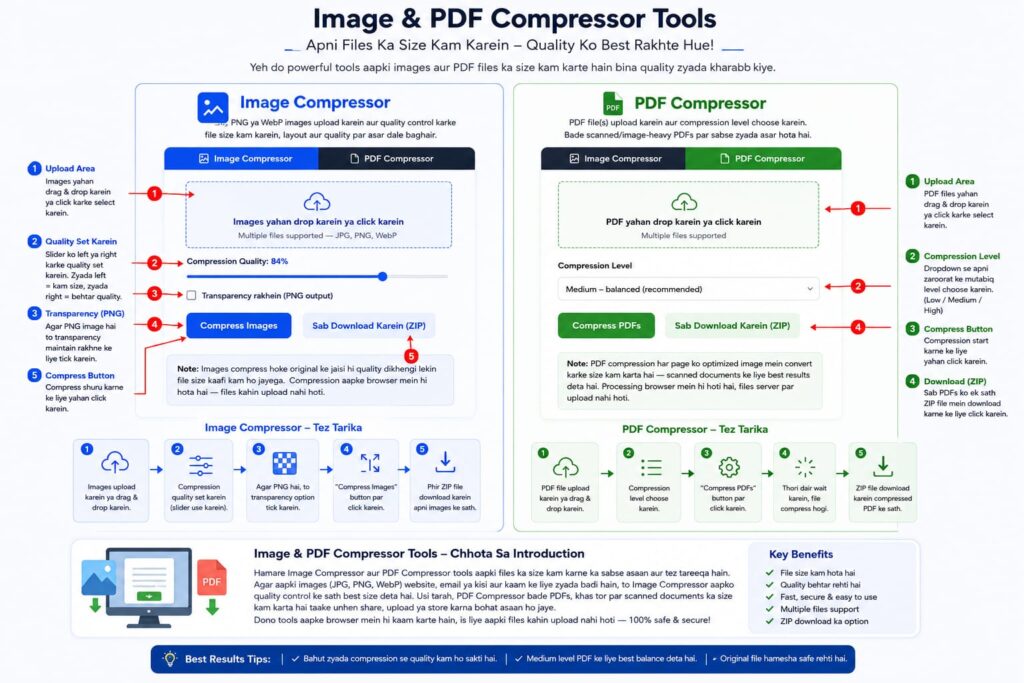
The Image Compressor on LigalDocs.com takes that raw file and reduces its size while keeping it visually close to the original. You drop in one image or a whole batch of them — JPG, PNG, or WebP — and adjust a simple quality control until you land on the size-to-clarity balance you actually need. Sending a scanned exhibit that just needs to be legible? Push the compression a bit further and get the file down small. Submitting something where fine detail matters, like a photograph being used as evidence? Keep the quality higher and still walk away with meaningful savings over the original.
What makes this genuinely useful rather than just another slider-and-button tool is what happens after compression. Every file shows you the before-and-after side by side — the original size, the new size, and the percentage saved — so there’s no guessing about whether the compression actually did anything. And if you’re processing a stack of documents rather than a single photo, you don’t have to download them one at a time. Everything can be packaged into a single ZIP file and pulled down in one go, which matters a lot when you’ve got a case folder with dozens of images that all need to travel together.
There’s also a quieter but important detail here: the option to preserve transparency for images that need it, like a scanned signature or a logo that has to sit cleanly on a document without a white box around it. Most compression tools just flatten everything to a plain background and call it done. This one lets you choose, because sometimes that transparency is the whole point of the file.
The PDF Compressor Shrinking Case Files Without the Guesswork
PDFs are where legal work really lives — contracts, filings, discovery bundles, signed agreements, scanned dockets. And PDFs are also where file size problems get worst, because a single PDF can quietly contain dozens of full-resolution scanned pages stitched together, each one contributing to a file that’s suddenly too large to email, too large to upload, too large to even open comfortably on an older laptop.
The PDF Compressor handles this by processing every page of the document and re-rendering it at an optimized size and quality, so the whole file comes out dramatically smaller while remaining fully readable. Rather than making you guess at settings, it offers three compression levels — Low, Medium, and High — and the difference between them is straightforward. Low keeps things closest to the original, useful when you’re dealing with a document where visual fidelity really matters. Medium is the sensible default for most everyday use, the setting most people will reach for without thinking twice. High goes further, aggressively cutting size for situations where you just need the file small enough to get through a stubborn upload limit, and the content itself is still perfectly legible even if it’s no longer pixel-perfect.
This matters most for the kind of documents that show up constantly in legal work but rarely get proper attention: scanned court filings, bundles of signed contracts, discovery documents that were photocopied, faxed, scanned, and photocopied again until the file itself became a monster. The PDF Compressor takes that bloated file and brings it back down to something reasonable, page by page, without anyone having to manually flatten, crop, or re-scan a single sheet.
Just like the Image Compressor, it supports batch processing. Upload several PDFs, run them through together, and download the results as a single ZIP archive instead of managing five or six separate downloads. For anyone dealing with a full case file rather than one isolated document, that batch workflow saves real time.
One honest note worth mentioning, because it matters for legal accuracy: this compression method works by optimizing each page as an image, which is ideal for scanned documents and anything that started life as a photograph or a photocopy. If a PDF was originally generated as pure digital text — something exported straight from Word, for instance — running it through this compressor will still shrink it and it will still look correct, but the text inside it will no longer be selectable or searchable the way it was before. For scanned exhibits, signed paperwork, and photographed documents — which is the overwhelming majority of what needs compressing in the first place — this is exactly the right trade-off. For a purely digital contract that hasn’t been scanned or printed, it’s worth keeping the original alongside the compressed copy if searchable text is something you’ll need later.
Everything Happens On Your Screen Not on Someone Else’s Server
For a legal document tool, this point isn’t a footnote. It’s arguably the most important part of the whole thing.
Both the Image Compressor and the PDF Compressor process files entirely within your own browser. Nothing gets uploaded to a remote server to be compressed and sent back. The file you drop in never leaves your device during the process — the compression happens locally, using your browser’s own processing power, and the result is generated and ready to download without ever touching an external system.
For anyone handling client documents, this isn’t a nice-to-have. It’s the difference between a tool you can actually use for sensitive material and one you have to think twice about. A scanned passport, a signed settlement agreement, a piece of evidence tied to an ongoing case — none of it needs to sit on a third-party server, even briefly, even “just for processing.” With this setup, it doesn’t. What you upload stays exactly where you are.
Designed to Work Wherever You’re Working
Legal work doesn’t happen exclusively at a desk anymore. A lot of it happens on a phone between meetings, on a tablet in a courthouse hallway, or on whatever laptop happens to be open at the time. Both tools were built with that reality in mind — the layout adjusts cleanly across screen sizes, controls stay easy to tap rather than requiring pixel-precise clicking, and nothing about the experience depends on having a large monitor or a mouse. Whether you’re compressing a scanned exhibit from a phone camera roll or running a batch of contracts through on a desktop before a filing deadline, the tool behaves the same way and gets out of your way just as quickly.
How People Are Actually Using These Two Tools Day to Day
It helps to think about this in terms of the ordinary tasks that fill up a legal professional’s week, because that’s really where the value shows up.
A paralegal preparing a discovery bundle might have thirty scanned pages from three different sources — a fax, a photocopier, and a phone camera — each one a different size and resolution. Instead of manually resizing each one in an image editor, the whole batch goes through the Image Compressor together, comes out consistent, and drops into the final PDF without anyone noticing a quality difference.
A solo practitioner filing through a court’s e-portal hits the upload cap on the very last document of the day, an otherwise routine motion that happens to include a few scanned attachments. Rather than splitting the file into two separate uploads and hoping the clerk’s office accepts them as a matched pair, running it through the PDF Compressor on Medium brings it under the limit in under a minute, and the filing goes through as one clean document.
A notary handling a stack of signed forms at the end of the day scans everything on their office printer, which — like most office scanners — defaults to a resolution far higher than anyone actually needs for a legible signature page. Before these were compressed, that stack sat as a nine-megabyte monster clogging up the shared drive. Now it’s a fraction of that, and nobody downstream even notices the difference in quality.
A small business owner drafting their own agreements without a law firm behind them just needs to email a signed contract back and forth a few times as revisions happen. Every version accumulates a little more size if it’s been printed, signed, and rescanned along the way. Running it through the compressor once before hitting send keeps the whole exchange fast and keeps inboxes from clogging up over something as simple as a two-page agreement.
None of these are dramatic use cases. They’re the unremarkable, repetitive moments that make up most of a working day in legal administration — and that’s exactly the point. A tool doesn’t need to be flashy to be genuinely useful. It just needs to solve the same annoying problem reliably, every single time someone runs into it, without asking for an account, a subscription, or a leap of faith about where the file is actually going.
A Small Tool Solving a Real, Recurring Problem
Neither of these tools is trying to reinvent document management. They’re solving one specific, recurring annoyance: files that are bigger than they need to be, standing between you and wherever that file actually needs to go. That’s a small problem on any single day, but it’s one that repeats constantly in legal and administrative work — every scanned exhibit, every signed page, every discovery bundle, every client upload.
Having a reliable, private, and genuinely simple way to shrink those files, right there on LigalDocs.com alongside the rest of the document tools, means one less obstacle standing between the paperwork and the person who needs it. Upload the file. Adjust the setting if you want to. Download something smaller. That’s the whole idea — no accounts, no waiting on a server somewhere else, and no compromise on the confidentiality that legal work demands in the first place.
Kyun Banaye Humne Ye Tools Aur Wo Bhi Free
Chaliye seedhi baat karta hoon. Jab humne ye tools banane socha tha, to wajah koi badi corporate strategy nahi thi bas ek simple si observation thi: log legal paperwork se darte hain, aur ziyada tar cases mein wajah ye nahi hoti ke kaam mushkil hai, balke ye hoti hai ke koi unhe simple zaban mein samjhata nahi. Wakeel ke paas jao, wo apni legal terminology use kare, aap sar hilate rahen, aur end mein bill aa jaye kisi aisi cheez ka jo shayad aap khud bhi kar sakte the agar koi tareeka pata hota.
To humne socha, chalo hum wo tareeka bana dete hain.
Stamp Paper wala masla
Agar kabhi khud se stamp paper likhne baithe hain to pata hoga problem ye nahi ke likhna mushkil hai, problem ye hai ke pata nahi chalta “sahi” tareeka kya hai. Hamara tool bas ek proper starting point de deta hai. Apni details daaliye, jo change karna hai kariye, bas ho gaya kaam. Personal use ho ya business chal jata hai.
Divorce Notice
Ye wala thora sensitive topic hai, isliye keh dena zaroori hai hum jaante hain ke jab koi is stage par hota hai to mood theek nahi hota. To hamne socha kam se kam paperwork wala hissa asaan bana dein. Bas basic info maangte hain aur ek proper notice tayyar ho jata hai. Situation to nahi badlegi ye tool, lekin ek stress kam ho jayega ye guarantee hai.
Employment Contract
Ye khaas taur par un logon ke liye hai jo apna chota business chala rahe hain aur jinke paas HR department nahi hai jo unke liye contracts likhe. Agar koi naya banda hire kar rahe hain, ye tool basically wahi kaam kar deta hai terms, responsibilities, sab kuch clear likha hota hai taake baad mein “ye to humne discuss hi nahi kiya tha” wali situation na aaye.
Partnership Deed
Kisi ke sath business start karna exciting hota hai — lekin boring wala hissa, matlab kaun kya owner hai, kis ki kya responsibility hai, profit kaise divide hoga yehi wo cheezein hain jo log skip kar dete hain shuru mein. Aur bad mein yehi cheezein masla banti hain. Ye tool aapko wo boring lekin important cheezein waqt par likhne pe majboor kar deta hai.
Power of Attorney
Is mein zyada kehne ko nahi hai — seedha sa process hai. Details daaliye, draft mil jayega, jo adjust karna hai kar lijiye. Bas blank page se shuru nahi karna padta, itna hi faida hai.
Demand Notice
Kisi ne paise dene hain, ya contract ka wada tora hai kabhi kabhi bas ek official-looking cheez chahiye hoti hai bhejne ke liye pehle kisi bade step tak jane se pehle. Ye tool wahi kaam kar deta hai — chand minute mein, na ke din lagakar.
Ab reality ye hai ke inme se kisi bhi tool ke liye legal background chahiye hi nahi. Aapko sahi terminology pata hone ki zaroorat nahi, formatting ki tension lene ki zaroorat nahi — bas jo pucha jaye wo fill kar dijiye, structure tool khud sambhal leta hai. Aur free hai, mobile pe bhi utni hi asani se chalta hai jitna laptop pe. Yehi to poora point hai — basic legal draft banwane ke liye paisa dena kyun zaroori ho.
Haan, agar koi bada legal matter hai to eventually kisi actual wakeel se check zaroor karwa lein. Lekin pehla draft banane ke liye — ye kaafi hoga, aur waqt aur paisa dono bachega.